Apply for the Pribyl Card and delivery
When you submit an application on the website with courier delivery, we will deliver your card to you on the same day or on any other date convenient for you
You can also visit the nearest branch of Uralsib and issue an instant card in 15 minutes
You can apply for a card in one of the convenient ways:
- By filling out an online application on the bank's website;
- By visiting a bank branch;
- If you are already a customer of The bank, you can apply for a card in Uralsib Online.
You can receive the card with free courier delivery. The method of receiving the card is specified when filling out the online application.
When the card is handed over for delivery, our representative will contact you to confirm the delivery address and clarify a convenient time for the courier's visit. The courier will bring you the card and applications for signature. After the documents are received by The bank, you will receive an SMS message stating that you can confirm your phone number and set the card PIN code
“Pribyl” is a debit card that allows you to earn up to 12% per annum on the actual daily card balance, as well as cashback on purchases
You will receive a non-personalized instant card with delivery to a place convenient for you. It will be the same card as a personalized one, only without your name on it.
A personalized card can be issued at a Uralsib office. Find the nearest office
The card can be ordered with free courier delivery to a location convenient for you. To do this, complete the card application and select the delivery address.
If you want to receive the card at the office, you can come to the Uralsib office and complete the application on site. Find the nearest office
A digital card is the same bank card, only without plastic. It can be used to pay for purchases in online stores and via the Faster Payments System (SBP) in regular stores, transfer money, and set up automatic payments.
An existing client can order a card in Uralsib Online. To become a client, fill out an application for a debit card.
If you ordered courier delivery, you may be asked to sign documents on paper or electronically in the Uralsib app or on the website of our partner www.efr.ru. After the agreement is concluded, you will receive a notification from NCO JSC NSD. This is a requirement of Federal Law No. 211-FZ dated July 20, 2020. In the document, the agreement is referred to as a "financial transaction" and is executed on the EFR website
- Wait for a call
Our representative will contact you shortly to agree on the delivery date and time. Please stay available. You will also receive an SMS with a link to the courier service personal account, where you can independently manage the delivery date, time and address. - Receive the card and sign the documents
We will deliver the card to a place and time convenient for you. Sign the documents. You may be asked to sign them on paper or electronically in the Uralsib app or on the website of our partner efr.ru. *
At the meeting, you will need your passport and a photo of yourself holding it — this will confirm that you are the one receiving the card. The envelope with the card has a QR code which you can use to obtain detailed information on using the card and installing the app on the Bank website. - Download the app or log in to your personal account
Manage your finances quickly and easily. To do this, connect Uralsib Online via the link and follow the instructions. Or use the QR code indicated on the envelope with the card.
Important:
— Install the app only from official sources.
— For quick access, save the password in your browser or password manager. - Wait for the card to be activated
First, you need to wait for an SMS confirming card activation within a few hours. Then set the PIN code and use the card.
* After concluding the agreement, you will receive a notification from NKO JSC National Settlement Depository (NSD). This is a requirement of Federal Law No. 211-FZ dated July 20, 2020. In the document, the agreement is referred to as a «financial transaction» and is executed on the EFR website.
Terms of service
For cards opened after 03.06.2024, no fee is charged.
For cards opened before 03.06.2024, if the free-of-charge conditions are not met, the scheduled fee charge date is the 5th day of the month, except on weekends, in which case the scheduled date is moved to the next business day.
The "Notification Service" costs RUB 129 per month. No fee is charged for the first month.
An instant card does not contain the cardholder's name. There is no functional difference between named cards and instant cards. Instant cards can only be obtained at a branch, and they are issued immediately on the day of application.
Yes, you can issue additional Pribyl cards for your card account. Please note that additional cards can be issued if you have a personalized Pribyl card.
The maximum number of card accounts that can be opened in the name of one client is no more than 2.
For new clients
The program is connected automatically to the Pribyl Card debit card.
Each month, select and confirm 3 categories out of 5 offered in your Uralsib Bonus personal account in the «Favorite categories» section and pay for purchases with Uralsib cards. Bonus rubles will be credited immediately after the transaction is processed. On average, this takes about 3 days.
Download the Uralsib Online app.
- If you have already registered with Uralsib Online, click “Log in with password” and enter your username and password.
If not, select “Need a password?” - On the sign-in page, enter your card or account number and mobile phone number.
- Click the “Get password” button.
- Confirm registration with an SMS password.
- Enter your username and password.
You can recover your username and password for Uralsib Online on the website online.uralsib.ru or in the bank’s app under «Recover password». To do this, you will need any Uralsib card.
After you have confirmed your phone number and set a PIN code, you can activate contactless payment using any of the convenient methods below:
- Insert the card into an ATM, enter the PIN code, and request the balance.
- When making your first purchase in a store, insert the card into the payment terminal and enter the PIN code.
Connect the Faster Payments System (SBP) and make transfers throughout Russia without a fee for amounts up to 100 000 rubles per month.
To do this, in the app open the «More» section → «Transfers by phone number» and activate the «Send and receive transfers via the Faster Payments System (SBP)» function.
After connection, in the «Payments» section select «By phone number», enter the recipient's phone number and specify the bank for the transfer.
Connect Uralsib Online for convenient management of your finances:
- top up your account free of charge by card-to-card transfer using the Faster Payments System (SBP);
- exchange bonus points for cashback or certificates;
- pay for housing and utility services, traffic police fines, taxes, and phone services without a fee.
Choose a convenient way to connect the service:
- on the website online.uralsib.ru,
- by phone 8 800 250-57-57,
- at the bank branch.
If you applied for courier delivery of the card, you will need to set the PIN code yourself:
Wait for an SMS from the bank notifying you that you need to set a PIN code for your card.
You can set the PIN code in two ways:
- After registering at online.uralsib.ru or in the mobile app, tap your card on the main screen, select the “About the card” menu item, then “Change PIN code”.
- Or call Uralsib’s toll-free hotline from your mobile phone at 8 800 250-57-57 and follow the voice menu prompts.
If you have arranged courier delivery of your card, you will need to confirm your phone number yourself:
Wait for an SMS from the bank informing you that confirmation of your phone number is required.
You can confirm your number in two ways:
- Register at online.uralsib.ru or in the Uralsib mobile app using your card number and mobile phone number. An SMS with a login code will be sent to the specified number. After the code is entered successfully, your phone number will be confirmed automatically.
- Alternatively, call the Uralsib toll-free hotline from your mobile phone at 8 800 250-57-57 and follow the voice menu prompts.
Interest accrual on the balance and cashback
To exchange bonus rubles for cashback, you need to:
- Make purchases with your card that are eligible for compensation with bonus rubles. These may include purchases in selected categories or from the bank's partners. The card must also be enrolled in the loyalty program.
- In a month, bonus rubles will be credited to you.
- Go to your loyalty personal account and select a purchase for compensation.
- Confirm the exchange of bonus rubles.
Purchases in the amount of 1 500 to 50 000 ₽ for the previous calendar month will be available for compensation.
Before the exchange, make sure that you have an active card in rubles and that it is enrolled in the Uralsib Bonus program. According to the Program Rules, funds may be credited only to a card account in rubles. Otherwise, the exchange transaction will not go through, and the bonus rubles will be returned to your bonus account.
- The validity period of bonus rubles is 12 months from the date they are credited. This means that bonus rubles that you did not use within 12 months after they were credited expire.
- The balance of bonus rubles in the account is reset in full if there are neither accruals nor write-offs to the bonus account for 6 months.
- If the overdue period for any credit products exceeds 30 days, the balance of bonus rubles is reset in full. Accrual of bonus rubles will be restored only one month after the overdue debt is fully repaid.
Bonus rubles for purchases in categories are credited separately for each transaction. You can view accruals in the «Transaction History» section of your personal account.
Bonus rubles under the «Premium banking» service package, «Private Banking» / «Private» are credited monthly on the 10th day of the month following the month of spending.
Bonus rubles for assets under the «Premium banking» service package are credited as a separate amount on the 26th day of the month following the month of spending.
Bonus rubles with partners in the «Online Partners» section are credited upon confirmation by the partner, on average within 45 days after the purchase is made.
There are three ways to spend bonus rubles:
- Compensate a purchase with bonus rubles and receive cashback in the amount of one of the purchases made.
- Use bonus rubles for partial or full payment of rail and air tickets, hotel booking, or car rental in the Travel for Bonuses section.
- Exchange bonus rubles for RZHD Bonus points — they can then be used to purchase rail tickets or upgrade the comfort of your trip.
- Log in to your Uralsib Bonus personal account and go to the “Travel” section.
- Select a ticket, hotel, or car.
- Fill in all the required fields and choose additional services.
- Specify that bonus rubles will be used to pay for the order.
- Complete the payment and place the order.
For payment, you can use any bank card or pay up to 100% of the cost of the selected service with bonus rubles.
The exchange rate for bonus rubles in the “Travel for Bonuses” section is: 1 bonus ruble = 1 ₽.
You can also convert bonus rubles into RZHD Bonus points. This will allow you to use them to purchase rail tickets or enhance the comfort of your journey.
To do this, you need to:
- In your Uralsib Bonus personal account, go to the “Partner Bonuses” section.
- Enter the RZHD Bonus account number. You can transfer bonus rubles both to your own account and to the account of your relative or friend.
- Enter the amount of bonus rubles to exchange. Minimum 100 bonus rubles. Exchange rate: 1 bonus ruble = 1 RZHD Bonus point.
- Confirm the transaction.
The bonuses will be credited to the RZHD Bonus account within 10 business days.
In the personal account of the mobile app or the Uralsib Online web version.
To do this, you need to:
- Find on the main screen the button labeled «Uralsib Bonus» or the Uralsib logo and the amount of accrued bonus rubles.
- Tap the button and go to the Uralsib Bonus personal account. There you will be shown the accrued bonus rubles.
In your personal account, you will be able to:
- find out the amount of accrued bonus rubles,
- view the latest credits to the bonus account and transaction history,
- compensate purchases,
- exchange bonus rubles for travel bonuses or for RZD points,
- purchase something with cashback of up to 30% in stores and services from the «Online Partners» section.
To receive interest on the balance on the Pribyl Card, set a PIN code for the card, maintain a balance of up to 1,000,000 rubles during the month, and pay for purchases with the card. Interest will be paid every month on the date the PIN code was set for the card.
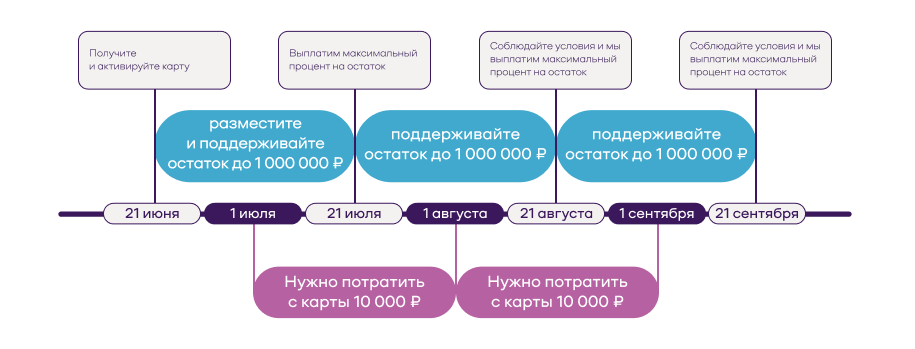
How interest on the balance is accrued for the Pribyl Card
- Activate the card
On June 21, you received the Pribyl Card and set a PIN code. Now the 21st is the date interest will be paid on the balance of funds in your card. This date will be different for each card. - Put money on the card and do not withdraw it
On June 21, deposit up to 1,000,000 rubles into the account and keep them on the card until July 21. - Make purchases
From July 1 to 31, pay for your regular purchases with the card. To receive the maximum interest on the balance, you need to spend at least 10,000 rubles. In the first month after receiving the card, we will accrue increased interest on the daily balance even if you did not have time to spend 10,000 rubles. In the next month, the interest on the balance will be maximum only if you spend at least 10,000 rubles. - Receive interest
On July 21, we will accrue 12% per annum on the daily balance for the period from June 22 to July 21 in accordance with the tariffs.
What else is important to know
- Payment date
It is unique for each card and coincides with the date the PIN code was set. - Interest calculation
Calculated daily on the actual balance of funds on the card at the beginning of the day. For example, if the PIN code for the card was set on June 21, the interest period will run from June 22 to July 21 and then on the same dates each month. - Interest rate
Depends on the amount of purchases in the previous month and the balance in the account. If the conditions are not met, interest will not be accrued.
To receive the maximum rate, two conditions must be met:
— Purchase amount — at least 10,000 rubles per month.
— Balance in the card account — up to 1,000,000 rubles. No interest is accrued on any amount above this. - Interest payment
Interest is paid to the card account monthly on the date the PIN code was set. The card interest payment date can be viewed in your personal account on the website or in the mobile application. - Weekends and holidays
If the payment date falls on a non-working day, interest will be accrued on the nearest business day. - Interest when closing the card
If the card is closed before the end of the interest accrual period, interest for an incomplete period will not be paid. For example, if you opened the card on June 21, the card can be closed no earlier than the 22nd of each month in order to receive interest on the balance for the month.
3 categories to choose from
Each month, select and confirm 3 categories out of 5 offered in your Uralsib Bonus personal account in the «Favorite Categories» section and pay for purchases with Uralsib cards. Bonus rubles will be credited immediately after the transaction is processed. On average, this takes about 3 days.
Up to 30% with partners
Receive an additional up to 30% in bonus rubles in stores and services from the Uralsib Bonus personal account in the «Online Partners» section
More details in the Uralsib Bonus section.
Interest is calculated daily on the actual account balance at the beginning of the day. This means that if funds were deposited on Monday, interest on them will start accruing from Tuesday.
The interest rate is determined taking into account the amount of spending for each previous calendar month.
Interest is paid monthly on the card opening date through capitalization — crediting to the account. If the interest payment date falls on a weekend or public holiday, interest is paid on the next business day.
The website and the Uralsib app show annual interest rates. If the account is closed before the end of the interest period, interest for an incomplete period is not paid.
1. Interest accrual on the balance of the card account up to 1 000 000 rubles:
- With turnover of at least 10 000 rubles — 12%.
- In other cases — 0%.
2. Interest accrual on the balance of the card account above 1 000 000 rubles — no interest is accrued
* Not all cashless expense transactions are taken into account. The list of exceptions can be found in the “List of merchant type/MCC codes” in the section "Tariffs & fees - "Debit cards"
Cash withdrawal, card top-up, transfers
You can make a transfer using the Faster Payments System (SBP) – transfers without a fee up to 100 000 ₽ per month.
You can also make money transfers from card to card of any Russian bank. To do this, your card must be connected to 3-D Secure.
To make a card-to-card transfer, go to https://card2card.uralsib.ru/ and enter your card details and the recipient's card details. No fee is charged for transfers from a card of any bank to a card of Bank Uralsib.
The most convenient way to withdraw cash is through ATMs of Bank Uralsib and more than 25,000 ATMs of our partners: VTB Bank (PJSC), Gazprombank (JSC), Raiffeisenbank (JSC), and Alfa-Bank (JSC)
Information on ATM addresses and opening hours is available on the bank's website, as well as at Bank Uralsib branches.
Please follow a few simple rules when withdrawing cash from your card:
- Do not withdraw cash in deserted places or from ATMs of banks you do not know.
- When entering your PIN code, make sure no one is watching you and, if necessary, cover the keypad with your free hand.
- Take your cash from the ATM immediately, without waiting for the warning signal. Otherwise, the ATM will retain the “forgotten” card and cash. To recover them, you will have to contact the bank.
If you believe that fraud has been committed against you or your PIN code has become known to someone else, be sure to contact the Bank Uralsib Contact Center and block your card.
With the Pribyl Card, you can withdraw cash without any fee at Uralsib ATMs and at any banks of our partners within Russia, regardless of the amount of monthly purchases. More details about fees in other cases are available in the Tariffs & fees.
The fastest and most convenient way to top up your card is by transferring funds from a card of any bank to the «Pribyl» card in Uralsib Online. You can make a transfer using the Faster Payments System (SBP) — transfers without a fee up to 100 000 rubles per month. Make sure that the card of another bank is connected to the Faster Payments System (SBP) so that no fee is charged to the sender's card.
Starting from March 9, 2022, the Bank of Russia introduced for all Russian banks a temporary procedure for cash withdrawals from foreign currency deposits and accounts, including card accounts, valid until September 9, 2026.
What changes
- cash withdrawals of foreign currency will be made exclusively at the bank's cash desk and only in US dollars for accounts opened before 09.03.2022 00:00 MSC, regardless of the currency of this account. For example, if a card account is opened in euros, then when withdrawing cash, the funds will be issued in US dollars.
Cash withdrawals of foreign currency at Bank Uralsib ATMs and other banks' ATMs and cash withdrawal points are not available.
- during the period of the temporary procedure for cash withdrawals from foreign currency deposits and accounts, a limit is introduced on withdrawing no more than 10,000 $ in cash, at each bank where a foreign currency account was previously opened. Any amount above 10 000 $ can be received in rubles at the Central Bank rate.
- Non-cash transactions are available at the bank's exchange rate without restrictions.
The market exchange rate on the day of withdrawal is determined on the basis of data on the weighted average exchange rate of the relevant currencies, calculated from transactions concluded on organized trading on the day preceding the day of withdrawal.
Security
Immediately notify the bank by calling:
8 (800) 250-57-57 (within Russia)
+7 (495) 723-77-21, +7 (495) 723-78-21 (Moscow),
+7 (347) 2-519-519 (Ufa).
Inform the operator that the card has been lost and, if possible, provide its number and expiry date.
The card will be blocked immediately after your call. Please try to contact us as soon as you discover that the card is missing. In the event of a delayed notification, The bank shall not be liable for card transactions made without your knowledge.
After the card is blocked, it can no longer be used, and you will need to visit the bank branch where you completed the application form for opening the card account and issuing the card in order to have a new card issued to replace the lost one.
Increased cashback
Cashback can be earned at any stores in the “Garden and vegetable garden, home goods” category (MCC 5200, 5211, 5231 and 5261). Cashback also applies to purchases in online stores with the corresponding MCC.
Cashback is available at any pharmacies (Merchant Category Code (MCC) 5122, 5912). Cashback also applies to purchases at online pharmacies with the corresponding MCC.
Cashback is available at specialized pet supply stores (MCC 5995). Cashback also applies to purchases in online stores with the corresponding MCC.
Cashback can be received at restaurants and cafes (Merchant Category Code (MCC) 5812). Cashback also applies to online orders with the corresponding MCC.
Cashback can be received at any sporting goods stores in the “Sporting goods” category (MCC 5941 and 5655). Cashback also applies to purchases in online stores with the corresponding MCC.
Cashback is credited twice a month, in the middle and at the end, depending on when the purchase was made. The maximum crediting period is 30 days from the date of purchase.
Cashback is credited in the form of bonus rubles to your account in the Uralsib Bonus loyalty program. There are two ways to spend the accumulated bonus rubles:
- Refund to your card the amount of one of your completed purchases, i.e. compensate the purchase with bonus rubles, provided that the purchase amount is at least RUB 1,500;
- Use them for partial or full payment of rail or air tickets, hotel booking, or car rental in the "Travel for Bonuses" section.
The maximum cashback amount for the entire promotion period is 600 bonus rubles.
The maximum cashback amount for the entire promotion period is 1,200 bonus rubles.
Cashback is available only to a new bank customer who has not had an active card for at least 12 months before submitting the application.
Full terms of the promotion:
Как получить карту
Заявка на получение дебетовой карты курьером
Личные данные
Didn't find what you were looking for?
You can always contact us and find out the information you need.
For calls from Moscow
+7 495 723-77-77Free across Russia
8 (800) 250-57-57